Логотип Государственной Технической Службы
Мемлекеттік 
техникалық қызмет
STS Cyber Challenge 2026 іріктеу кезеңі аяқталды: 10 финалист команда анықталды

2026 жылғы 8 қазанда «Мемлекеттік техникалық қызмет» акционерлік қоғамы ұйымдастырған STS Cyber Challenge 2026 жыл сайынғы киберқауіпсіздік жарысының іріктеу кезеңі аяқталды.

Жарыс студенттердің киберқауіпсіздік саласындағы практикалық дағдыларын дамытуға, дарынды жас мамандарды анықтауға және саланың кадрлық әлеуетін нығайтуға бағытталған.

Алғашқы кезең онлайн CTF (Capture The Flag) форматында өтіп, 8 сағатқа созылды. Жарыс барысында қатысушылар осалдықтарды іздеу және талдауға байланысты практикалық тапсырмаларды шеше отырып, өз білімдері мен дағдыларын көрсетті.

Іріктеу кезеңінің қорытындысы бойынша STS Cyber Challenge 2026 финалына өткен, құрамында 33 қатысушысы бар 10 команда анықталды.

Іріктеу кезеңінің үздік үштігі:

  • 1-орын — 4 300 ұпай жинап, 17 тапсырманы шешкен FR13NDS TEAM;

  • 2-орын — 3 150 ұпай жинап, 12 тапсырманы шешкен pelmeni;

  • 3-орын — 1 650 ұпай жинап, 10 тапсырманы шешкен ksturobot.

Жарыстың финалдық кезеңіне өткен командалардың толық тізімі «МТҚ» АҚ-ның sts.kz ресми сайтында жарияланды.

STS Cyber Challenge 2026 қорытынды кезеңі 9–11 желтоқсан аралығында Астана қаласында нақты IT-инфрақұрылымды модельдейтін мамандандырылған киберполигонда өтеді. Финалистер Киберқауіпсіздікті қамтамасыз ету орталықтарының (КҚО) атынан шығатын Blue Team командаларына қарсы практикалық жарыстарға қатысады.

Жарыстың техникалық серіктесі ретінде практикалық тапсырмалар мен кибержаттығуларды өткізуге арналған технологиялық инфрақұрылымды қамтамасыз ететін Freedom Cloud компаниясы әрекет етеді.

«Мемлекеттік техникалық қызмет» АҚ командаларды іріктеу кезеңінен сәтті өтуімен құттықтайды және финалистерге жарыстың қорытынды кезеңінде сәттілік пен лайықты нәтижелер тілейді.

Жарыс туралы толық ақпарат келесі сайтта қолжетімді: https://challenge.sts.kz/

Танымал ұсыныстар

Жаңалықтар
Software Composition Analysis (SCA) as the Foundation of Supply Chain Security in DevSecOps Processes
The modern software development industry has undergone a fundamental shift from writing proprietary code to assembling applications from pre-built building blocks. Research shows that in modern commercial applications, third-party components, open-source libraries, and frameworks account for 80% to 90% of the entire codebase volume.

The use of open-source solutions significantly accelerates time-to-market and reduces development costs. However, this trend generates new attack vectors associated with Software Supply Chain Security. Vulnerabilities contained in widely used libraries are automatically imported into all dependent systems, creating large-scale risks, including data breaches, infrastructure disruption, and severe reputational damage.

Nature and Capabilities of the SCA Methodology

Software Composition Analysis (SCA) is an automated technology aimed at the inventory, identification, and risk management associated with the use of third-party and open-source components in a software product.

Unlike tools that analyze the quality and security of developers' proprietary code, SCA focuses exclusively on external dependencies. The primary functional capabilities of modern SCA solutions include the following areas:

  • Identification of Known Vulnerabilities (CVE): Comparing libraries and their versions used in a project against global vulnerability databases (e.g., the National Vulnerability Database — NVD) to detect known security defects.
  • Transitive Dependency Analysis: Many libraries import other components (dependencies of the second and deeper levels). SCA tools build complete dependency trees to identify hidden ("transitive") vulnerabilities that developers did not include directly.
  • License Compliance Audit: Checking third-party component licenses for compliance with the company's legal policies. This helps prevent the inadvertent use of libraries with restrictive copyleft licenses (e.g., GPL), which may require the company to open-source its own commercial product's codebase.
  • Obsolescence Control (Technical Debt): Monitoring the versions of packages in use. Outdated components not only harbor more latent defects, but also hinder system upgrade efforts when critical zero-day vulnerabilities are discovered.

Comparative Analysis: SCA, SAST, and DAST

To ensure comprehensive Application Security (AppSec), it is essential to clearly delineate the scopes of application for different security testing tools. The table below provides a comparison of key analysis technologies.

Comparison of Primary Security Testing Methodologies

CriterionSCASASTDAST
Object of AnalysisThird-party libraries and dependenciesProprietary application source codeRunning application in a runtime environment
Testing MethodWhite / gray box (manifest analysis)White box (static code analysis)Black box (external scanning)
Type of Defects DetectedKnown CVEs, licensing risksLogic flaws, injections (SQLi, XSS)Configuration errors, authorization issues
Implementation StageBuild and integration (CI/CD)Code authoring and buildTesting and operations
 
As seen in the table, SCA and SAST complement each other during the static analysis stage. SAST delves deeply into the structure of proprietary code (building abstract syntax trees, taint analysis), yet completely overlooks the internal design of packaged third-party dependencies. SCA, conversely, closes this SAST blind spot by auditing the entire imported software stack.

Integrating SCA into DevSecOps Processes and Best Practices

The implementation of SCA into the daily workflow of engineering teams must be carried out on the principle of continuous control, rather than periodic audits.

Automation in CI/CD

The most effective approach is to integrate SCA scanners directly into build pipelines (CI/CD pipelines). On every Pull Request or commit to the repository, the system should automatically scan dependency manifest files (such as package.json, pom.xml, requirements.txt).

Configuring automated Security Gates allows blocking builds or branch merges upon detecting vulnerabilities with a high severity level (e.g., $\text{CVSS} > 8.0$). This prevents dangerous flaws from entering the main development branch.

The MTTR Metric Challenge and Prioritization

One of the primary challenges when adopting SCA is the high alert volume, which leads to developer alert fatigue. The industry average Mean Time to Remediate (MTTR) for half of detected defects is approximately 252 days.

To optimize the vulnerability remediation process, the following practices are recommended:

  • Reachability Analysis: Using modern static analysis tools and runtime monitoring systems to verify whether a vulnerable function in a third-party library is actually invoked within the real execution context of the application. If the vulnerable code is physically unreachable, the remediation priority of such a CVE can be temporarily deprioritized.
  • Automated Dependency Updates: Utilizing specialized tooling to automatically create PRs with updated library versions where the vulnerability has already been resolved by the vendor's patch.

Conclusion

Software Composition Analysis (SCA) is no longer an optional tool in the cybersecurity professional's toolkit. In an era of extensive open-source adoption, securing the software supply chain becomes critically important. Regular dependency scanning, automated CI/CD checks, and fostering collaborative partnerships between development and security teams help minimize legal, financial, and technical risks, establishing a solid foundation for the secure evolution of IT products.
SOURCE CODE ANALYSIS (SCA)

What is SCA?
SCA stands for Source Code Analysis. It is one of the areas of testing digital objects aimed at the timely identification of vulnerabilities, weaknesses, and potential risks in software.

Why is source code analysis conducted?
SCA allows to:
• identify vulnerabilities and weaknesses in the code that can be exploited by attackers;
• reduce the risks of leakage and compromise of confidential information;
• ensure the protection of personal data;
• verify compliance with the requirements of legislation and standards in the field of cybersecurity;
• increase the level of trust in the information system;
• prevent potential incidents and damage to the organization.

How is SCA conducted?
The analysis combines automated and manual approaches.

  1. Automated analysis
    Specialized tools are used to identify vulnerabilities:
    • SAST — static analysis of source code without running the program;
    • SCA — analysis of third-party libraries and software components;
    • DAST — dynamic analysis of a running application.

  2. Manual analysis
    A specialist studies the source code in detail to identify potential problems that may be missed by automated tools, including: • vulnerabilities; • backdoors; • hidden software backdoors (implants); • undeclared capabilities (UDCs).

When UDCs are identified, the software structure and logic, function execution routes, and processed data are additionally analyzed, and the results are recorded in a report.

What is included in the analysis results?
Based on the results, a report is generated containing a list of identified vulnerabilities and UDCs, their descriptions, locations of discovery, and risk levels.

The scope of work for source code analysis is determined by its size.

The procedure and requirements for conducting source code analysis are established by Chapter 2 of the Methodology for Testing Digital Objects of the "Digital Government" and Critical Digital Objects for Compliance with Cybersecurity Requirements "Source Code Analysis" (Order of the Ministry of Digital Development, Innovation and Aerospace Industry of the Republic of Kazakhstan dated June 3, 2019, No. 111/NQ).

SCA is not just about finding bugs in the code. It is a comprehensive assessment of software aimed at reducing cybersecurity risks before the system is put into commercial operation.

ScanKZ: External Attack Surface & Perimeter Monitoring for Organizations

An organization’s Internet-accessible infrastructure is constantly changing. New domains and subdomains appear, web services are launched, network equipment settings change, and technologies and their versions are updated. Some of these resources are accessible from the Internet, which means information about them can be seen not only by the organization's employees, but also by potential attackers.

The more external resources an organization uses, the harder it is to manually maintain a complete and up-to-date picture of the infrastructure. Even a single forgotten domain, open port, or outdated service may require additional attention from the information security team.

That is why monitoring the external perimeter—everything that is accessible and can be discovered from the outside—becomes an important part of defense.


A View of Infrastructure from the Internet

ScanKZ is a platform for monitoring the external perimeter and automatically identifying potential vulnerabilities. It helps to see an organization's Internet-accessible infrastructure from the outside and understand what information about it can be obtained externally.

This approach allows specialists not only to assess resources known to them, but also to form a more complete picture of the external perimeter: what assets are available, what services run on them, what technologies are used, and where potential weak points may be located.

Instead of manually checking a large number of addresses, domains, and services, the team receives collected and structured information in one place.


What Data Is Available in the Platform

ScanKZ builds a technical picture of the organization's external perimeter. In the platform, you can obtain information about IP addresses, WHOIS, ASN, and providers, as well as data on domains, DNS, and SSL/TLS.

Additionally, information about open ports, accessible services, and web hosts is displayed. For discovered resources, you can get details about potential vulnerabilities that require the attention of specialists.

The data is supplemented with reports, statuses, and key metrics. This helps to navigate the state of the external perimeter faster and understand which resources need to be checked first.


For Cybersecurity and IT Teams

ScanKZ can be used by specialists responsible for infrastructure security and availability: SOC teams, information and cybersecurity specialists, system administrators, and heads of cybersecurity departments.

For SOC teams, the platform can become an additional source of information about the state of external assets. Information security specialists gain the ability to find potentially vulnerable resources faster, and system administrators can see which services and ports are accessible from the external network.

For cybersecurity leaders, the overall picture is important: what resources are part of the external perimeter, how its state changes, and what points require the team's attention.

This approach is especially relevant for organizations with a large and constantly changing Internet-accessible infrastructure, where manual control of all resources takes significant time.


Less Manual Checking — More Control

One of ScanKZ's tasks is to automate the routine collection and verification of technical information. The platform discovers assets and analyzes them, which reduces the time specialists spend on manual data searching.

Regular monitoring also helps to notice changes in the external perimeter faster and identify weak points at an earlier stage. The team gets an up-to-date understanding of which resources are accessible from the Internet and what technical information about them can be obtained from the outside.

As a result, specialists can focus not on data collection, but on analyzing it and addressing the detected potential risks.

ScanKZ combines the discovery of Internet-accessible assets, the collection of technical information, and the search for potential vulnerabilities into a single process. This helps make external perimeter monitoring more systematic, reduce manual work, and maintain an up-to-date picture of the organization's infrastructure.

Stay tuned for updates — we will announce the launch of ScanKZ on official information resources. To learn more about the platform's functional capabilities, technologies used, and technical specifications of ScanKZ, contact us by email: аcademy@sts.kz

Traces of deleted files: what the MFT table stores

Deleting a file from a computer does not always mean the complete disappearance of information about it. Its name, location, timestamps, and other metadata may remain in the file system. Thanks to this, specialists can determine which files were previously located on the device and what actions were performed with them. 

Such data is an important source of information when analyzing computer security incidents, recovering deleted objects, and investigating digital traces. 

Employees of the Malicious Code Research Center of the State Technical Service conducted research to study file data storage mechanisms in Windows operating systems. During the study, the structure and contents of the Master File Table (MFT) were examined, as well as the specifics of information persistence after file deletion. 

The Master File Table (MFT) is the primary structure of the NTFS file system, which is used by default in Windows operating systems. The MFT stores information about all files and folders located on the disk. A separate record is created for each object, containing key information about the file. After a file is deleted, its record remains in the MFT for some time, which makes it possible to recover the deleted data. 

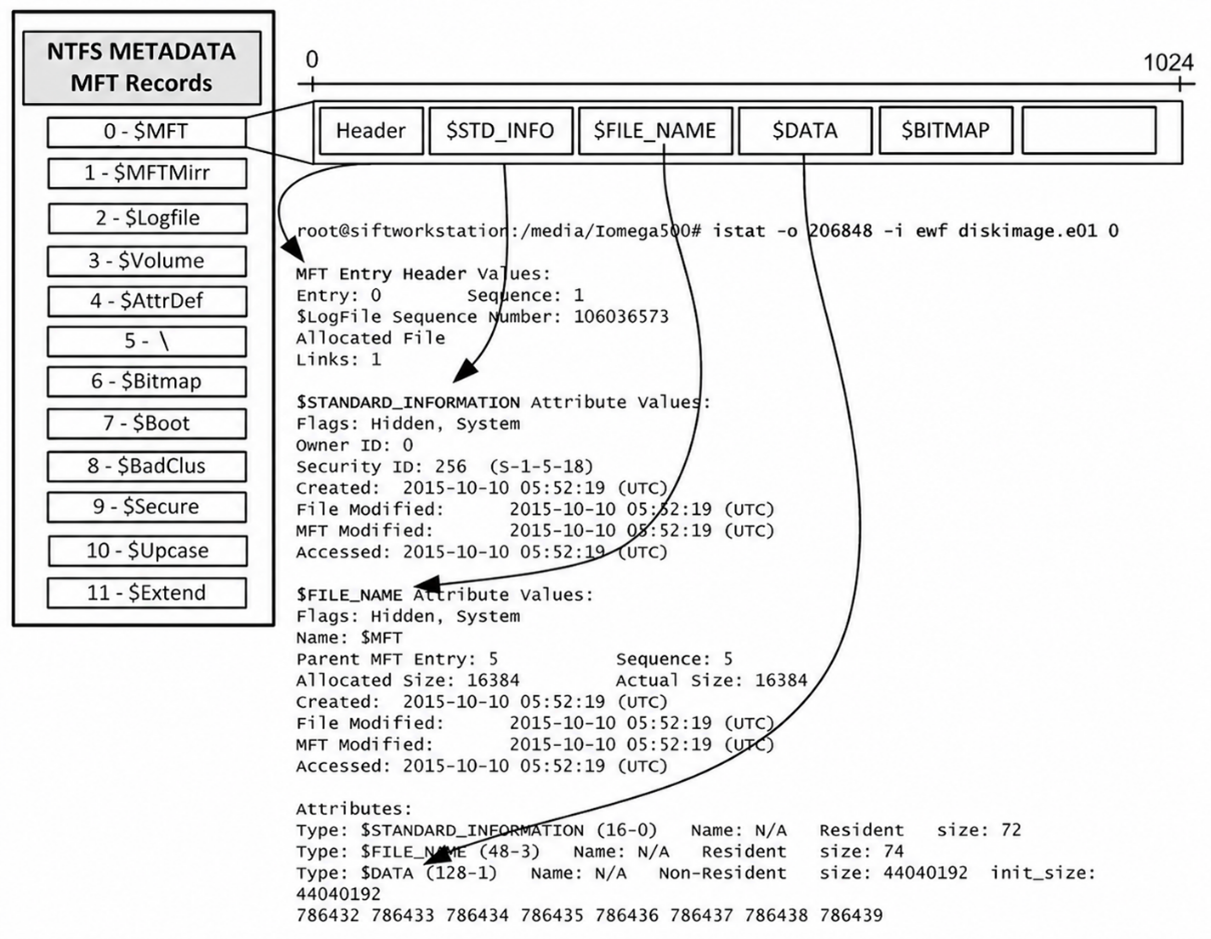
An MFT record consists of several attributes. At the beginning is the Header (FILE Record Signature), followed by the $STANDARD_INFORMATION (0x10) attribute, which contains timestamps and file attributes, including access permissions. The $FILE_NAME (0x30) attribute stores the name of the file or directory, as well as a reference to the parent directory. The $DATA (0x80) attribute contains the file data or references to the disk area where it is located. If the file size is less than 700 bytes, its data can be stored directly within the MFT record. 


Figure 1. MFT record structure in NTFS 


Structure of an MFT Record


Each attribute consists of two parts: a Header and Content. The header has the same structure for all attributes and contains information about the attribute type, its size, and name. The content depends on the attribute type and can vary in size. 

Attribute data in NTFS can be stored in two ways: 

A resident attribute is stored directly within the MFT record alongside its header. This method is suitable only for small attributes. 
A non-resident attribute is stored outside the MFT record in disk clusters. 
If an attribute is resident, its data is located immediately following the header. If an attribute is non-resident, the header contains information about where its data is located on the disk. 


Analysis of the $MFT File in FTK Imager


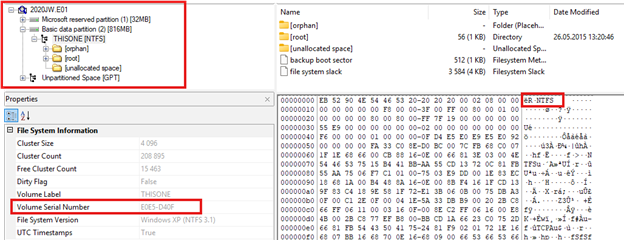
Figure 2. NTFS image in FTK Imager 

Figure 2 shows an image of the NTFS file system in FTK Imager. The left side of the window displays the Evidence Tree, showing the disk image, the NTFS partition, and its main elements. The lower left pane displays basic volume properties, including the Volume Serial Number used for unique identification, while on the right, the NTFS signature is highlighted in hexadecimal representation, confirming the file system type. 


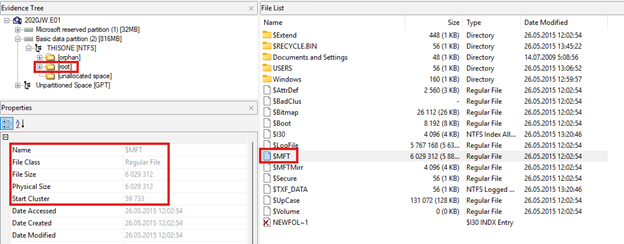
Figure 3. $MFT file in FTK Imager 

Figure 3 shows the location of the $MFT file in the root directory of the NTFS file system. The Evidence Tree pane shows navigation to the volume's root directory ([root]), which contains NTFS system files. The file list displays the $MFT file, while the properties panel lists its primary characteristics, including object type, file size, and the Start Cluster number, which defines where file storage begins on the disk. 


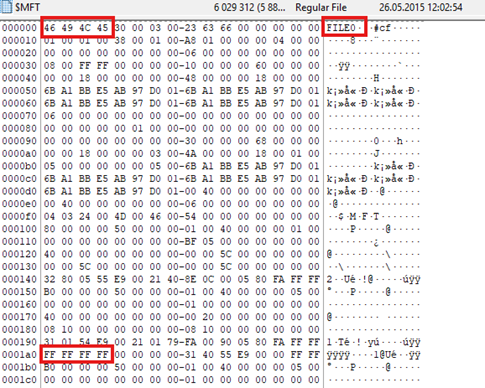
Figure 4. MFT record in hexadecimal representation 

Figure 4 shows an MFT record in hexadecimal representation. At the beginning of the record is the byte sequence 46 49 4C 45, which corresponds to the ASCII string FILE and serves as the MFT record signature. At the end of the record, the sequence FF FF FF FF is highlighted, indicating the end of the MFT record. In modern Windows versions, file content is not preserved in the record's unallocated area after being moved out of an MFT record. Instead, unallocated space is filled with zero bytes (\x00). 


Analysis of Residual MFT Data


Each MFT record has a fixed size of 1024 bytes. It stores information about a file or directory. If directory data is small, it is stored directly within the MFT record. When the amount of data grows and no longer fits, the data is moved to another location on the disk, leaving a reference to its location in the MFT record. After files are deleted or directory information is moved, part of the metadata may remain in the unused area of the MFT record, known as MFT Slack Space. Information regarding file names, locations, and other metadata can persist in this area. This data makes it possible to establish that a file previously existed in the system and was located in a specific directory, even if the file itself has been deleted. 


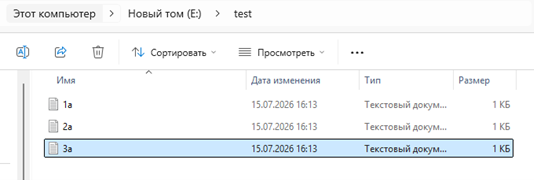
Figure 5. The analyzed test directory 

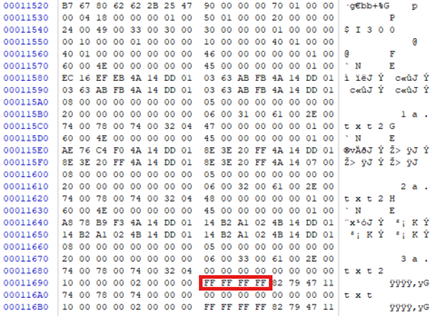
To investigate residual MFT data, a directory named test was created containing three files: 1a.txt, 2a.txt, and 3a.txt (Figure 5). Since the directory is small, information about its contents is stored directly in the $INDEX_ROOT attribute of the MFT record. Figure 6 displays the file index entries containing their primary metadata, along with the end-of-index entry signature FF FF FF FF. 


Figure 6. MFT record before deleting the file 3a.txt


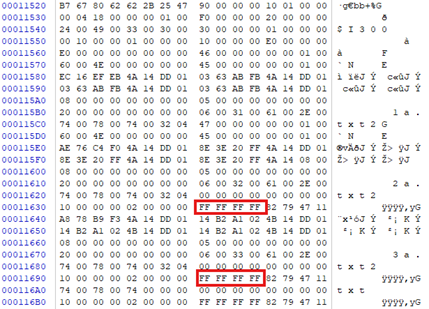
Figure 7. MFT record after deleting the file 3a.txt


After deleting the 3a.txt file, the MFT record for the test directory was re-examined in Figure 7. Analysis revealed changes in the metadata fields of the $INDEX_ROOT attribute, indicating an update to the directory index structure. However, the entry for 3a.txt was partially preserved in the binary data of the MFT record. Between the end-of-index signatures (FF FF FF FF), residual data (MFT Slack) remains, containing part of the deleted file's metadata. 


MFT Analysis Using MFTECmd


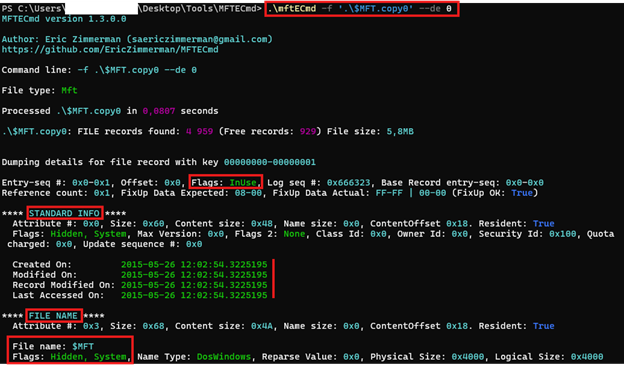
Figure 8. MFT record in MFTECmd 


The MFTECmd utility was used to analyze the $MFT file. Figure 8 shows record 0, which corresponds to the $MFT file. The InUse value in the Flags field indicates that the record is in use by the file system. An IsFree value would mean that the record is unallocated and the file or directory was deleted, though its metadata might still persist. For the $MFT file, the Hidden and System attributes are set, indicating that it is a hidden NTFS system file and is not visible to the user during normal browsing. The STANDARD_INFO and FILE_NAME attributes are also displayed, containing basic information about the $MFT system file. 

Four timestamps are stored in the $STANDARD_INFORMATION attribute. They are referred to as MAC(B) timestamps: 

- Modified: The time of the last modification of the file content. This value updates when a document is saved. It does not change when renaming or moving a file. 
- Accessed (Last Accessed): The time the file was last accessed. It updates when a file is opened or read. In modern Windows versions, updating this timestamp is often disabled, so it is not always accurate. 
- Changed (Record Modified): The time of the last modification to the MFT record. This timestamp updates when file metadata changes, such as access rights, attributes, or hard link counts. It is not the file creation time. 
- Birth (Created): The file creation time on this NTFS volume. When copying a file, this reflects the time of copying rather than the creation date of the original file. 
The Birth time is not stored in all file systems; this timestamp exists only in NTFS. Each file in NTFS contains eight timestamps: four are in the $STANDARD_INFORMATION attribute, and another four are in the $FILE_NAME attribute. 


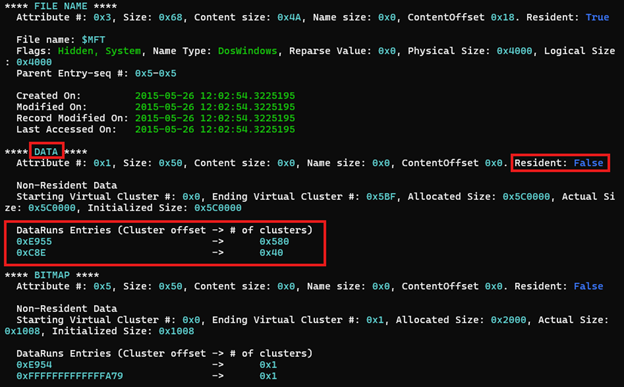
Figure 9. MFT record in MFTECmd 

Figure 9 displays the DATA attribute of the $MFT file. The value Resident: False indicates that the file contents are not stored directly within the MFT record, but are placed in separate disk clusters. Their location is defined by the NTFS Data Runs list (DataRuns Entries), which specifies the offsets and number of allocated clusters for storing the file's data. The presence of multiple Data Runs entries indicates that the file data is fragmented across several disk regions. 


Figure 10. MFT timestamps in Timeline Explorer 


Figure 10 illustrates Timeline Explorer, where two columns are displayed for each timestamp type: Created, Last Modified, Last Record Change, and Last Access. Columns ending in 0x10 contain values from the $STANDARD_INFORMATION attribute, while columns ending in 0x30 contain values from the $FILE_NAME attribute. 

$STANDARD_INFORMATION timestamps are accessible via the Windows API and are displayed, for instance, in Windows Explorer. $FILE_NAME timestamps are not directly displayed by built-in Windows tools and are typically used by the NTFS file system itself. 

Some of the 0x30 columns remain empty. This means that the timestamp value in the $FILE_NAME attribute matches the value in the corresponding $STANDARD_INFORMATION (0x10) column. Discrepancies between them may indicate timestamp manipulation (timestomping). However, such differences are not proof of timestomping on their own, as they can also occur during normal Windows operations. 


Conclusion


Throughout the examination of the MFT, its structure, key NTFS record attributes, and file metadata storage specifics were studied. Practical analysis using FTK Imager, MFTECmd, and Timeline Explorer made it possible to examine the contents of the $MFT file, trace record changes following file deletion, and identify the persistence of residual data within MFT Slack Space. Thus, the analysis demonstrated that the MFT is an essential source of information regarding files, directories, and file system events, making it a primary object of investigation.

Corporate Instagram account security audit: what to monitor regularly

A corporate Instagram account is a vital communication channel for a company and can easily become a target for malicious actors. To minimize the risks of unauthorized access, data leaks, and loss of account control, we highly recommend conducting regular security audits of its settings.


1. Check Public Contacts

Go to the "Edit Profile" section and ensure that only your corporate email and corporate phone number are listed on the account.

If you find any unknown or outdated contact details, they should be removed immediately.


2. Review Personal Information

Navigate to:

Settings → Accounts Center → Personal details

Pay special attention to the following data:

  • The email address must be corporate.

  • The phone number must belong to the responsible company employee.

If an unfamiliar phone number is listed in the settings, you must identify its owner and verify that access belongs to an active employee, not a former worker or an unauthorized person.


3. Set Up Two-Factor Authentication

Navigate to:

Accounts Center → Password and security → Two-factor authentication

To protect the account, it is essential to enable two-factor authentication (2FA).

Optimal verification methods include:

  • A corporate phone number;

  • An authenticator app.

It is not recommended to use the personal phone numbers of employees, as they may leave the company and retain access to the account.


4. Check Active Sessions

Under the "Where you're logged in" section, review the list of devices and geographical locations from which the account has been accessed.

If you detect suspicious or unknown sessions:

  • Terminate the active session.

  • Change the account password immediately.


5. Check Third-Party Apps and Connections

Ensure that no unknown services, applications, or business accounts are connected to the account.

Special attention should be paid to the following categories of services:

  • Mass-following, mass-liking, and mass-messaging tools;

  • Services for artificially inflating followers and engagement;

  • Applications that require a login and password instead of official authorization via Meta;

  • Data parsers and scrapers.

Using such tools can lead to account functionality restrictions, reduced reach, temporary suspension, or a complete loss of access. Furthermore, sharing your login and password with third-party services drastically increases the risk of account compromise.


6. Review Employee Access Permissions

If account management is handled through Meta Business Suite, open the section:

Business Settings → People

You should regularly audit the list of users with access to the account to:

  • Remove terminated employees;

  • Revoke access for individuals who no longer need it;

  • Grant the minimum necessary access rights corresponding to current job responsibilities.

Adhering to the principle of least privilege significantly reduces the risk of unauthorized actions within the account.


Final Checklist

Before concluding your audit, ensure that:

  • Public contacts contain only corporate data.

  • The corporate email and the responsible employee's phone number are up to date.

  • Two-factor authentication is enabled.

  • All suspicious sessions have been terminated.

  • Unknown apps and connections are disconnected.

  • The list of employees with access is up to date and reflects the current company structure.

Regularly checking these parameters will help maintain control over your corporate account and reduce the likelihood of compromise.


Author: Renat Tukanov, Chief Technology Officer at Freedom Holding Corp.

Key Vulnerabilities in Industrial Control Systems (ICS / АСУ ТП / ӨБАЖ): August–September 2025

In recent months, leading global companies producing equipment for industrial automation systems — Siemens, Rockwell Automation, Schneider Electric, ABB, and others — have reported new critical vulnerabilities in their products.
Controllers (PLCs), SCADA/HMI systems, engineering stations, network modules, and other equipment used in industrial and infrastructure facilities are at risk.

Why this matters for Kazakhstan

These solutions are widely used in Kazakhstan — in the oil and gas, energy, transport, utilities, financial sector, and even healthcare.
If these vulnerabilities are exploited by attackers, it could lead to production downtime, power outages, or disruption of urban infrastructure.

This material is prepared for cybersecurity professionals and helps prioritize vulnerability remediation. Specific applicability depends on the versions of hardware and software used at facilities.


Key developments from major vendors

Siemens

In August and September, the company released nearly 30 security updates. The most critical include:

  • CVE-2025-40804 (CVSS 9.3) — a vulnerability in SIMATIC Virtualization as a Service. Allows an attacker to access or modify confidential data without authorization.

  • CVE-2025-40746, CVE-2025-40751 — issues in SIMATIC RTLS Locating Manager enabling execution of arbitrary code with administrative privileges.

  • Vulnerabilities in UMC, Simotion, Industrial Edge, and Sinamics were also fixed, which could allow remote code execution (RCE) or denial of service (DoS).

Risks: unauthorized access to engineering stations, PCS7 and WinCC failures, and manipulation of controller configurations.


Schneider Electric

Four critical vulnerabilities were found in EcoStruxure Power Monitoring Expert, Power Operation, and Power SCADA Operation, allowing potential remote code execution or data leakage, which is especially dangerous for energy systems.

In Modicon M340 controllers and communication modules, issues that could cause device failure via malicious FTP commands were fixed.
Vulnerabilities in Software Update allowing privilege escalation or file corruption were also corrected.

Risks: distorted monitoring and control data, and potential preparation for attacks on critical infrastructure.


Rockwell Automation

  • CVE-2025-7353 (CVSS 9.3) — critical vulnerability in ControlLogix Ethernet modules, allowing full device control.

  • CVE-2025-9364 — in FactoryTalk Analytics LogixAI, a Redis database misconfiguration could lead to data leakage and privilege escalation.

  • CVE-2025-9161 — in FactoryTalk Optix, malicious plugins could be uploaded and executed via MQTT.

Risks: full controller compromise, SCADA system failures, and analytics platform compromise.


ABB

Critical vulnerabilities were found in ASPECT, Nexus, and Matrix, including authentication bypass and remote code execution (RCE) without authorization.
Some of these have CVSS scores up to 9.8, making them extremely dangerous. ABB recommends updating to version 3.08.04-s01 or higher or isolating vulnerable systems from the network.

Risks: remote takeover of industrial systems and compromise of critical operations.


Overall analysis

In recent months, there has been an increase in complex attacks where multiple vulnerabilities are exploited simultaneously.
A purely reactive approach — applying updates only after incidents — is no longer sufficient.
A shift toward a resilient architecture is required, which includes:

  • Inventory of all assets and their vulnerabilities;

  • Network segmentation according to the Purdue model;

  • Implementation of Zero Trust principles;

  • Continuous monitoring and integrity checks of systems.


Practical recommendations

1. Patch and update management

  • Maintain an inventory of devices and their vulnerabilities.

  • Evaluate how updates will affect the production process before deployment.

  • Test patches in isolated environments.

  • If updates are not possible, use virtual patching and disable unused services (FTP, Redis, web-debug).

  • Regularly monitor vendor security advisories.

2. Network segmentation

  • Segment networks by levels: corporate, DMZ, SCADA, controllers, and field devices.

  • Eliminate direct Internet access.

  • Use jump servers and data diodes for secure data transfer.

  • Implement multi-factor authentication and minimum privileges.

  • Restrict protocols and ports to only those necessary (CIP, Modbus, Profinet, etc.).

3. Monitoring and threat detection

  • Deploy specialized OT network monitoring.

  • Integrate data with SOC/SIEM.

  • Monitor PLC and SCADA configuration integrity.

  • Use Threat Intelligence to detect new attacks.

  • Set up anomaly detection — e.g., suspicious FTP commands or unauthorized Redis access.

4. Incident response and training

  • Update response plans for DoS, PLC compromise, etc.

  • Conduct realistic drills and tabletop exercises.

  • Train personnel to recognize phishing and intrusion indicators.

  • Analyze every incident to continuously improve defenses.

5. Legacy systems management

  • Implement application whitelisting on engineering stations and servers.

  • Block unauthorized USB devices.

  • Strictly control remote connections.

  • Isolate legacy systems where updates are not possible.


Useful links

Recommendations for improving the security of wireless infrastructure

With the widespread use of digital devices connected to wireless networks — such as ticker tapes, electronic queues, information panels, self-service terminals, interactive kiosks and media screens — the vulnerability of private business infrastructure to cyber threats has increased significantly. Malfunctions in the operation of these devices caused by intruders can entail not only financial but also image losses for entrepreneurs.

Cases of hooligan hacking aimed at discrediting or temporarily disabling equipment are becoming especially relevant.In this regard, in order to increase the security of the wireless infrastructure of private business facilities and minimize the risks of unauthorized access, it is recommended to implement the following technical and organizational measures:
• Configure a wireless network using the WPA3 protocol. If it cannot be used, use WPA2 with the TKIP algorithm disabled. Prohibit the use of outdated and vulnerable encryption protocols, including WEP, WPA and WPA2-PSK. • Set a unique SSID name that does not contain information about the type of equipment or its owner.
• Enable connection logging to track the time and devices that connected to the network.
• Restrict device connections using lists of allowed MAC addresses or implement authentication based on digital certificates.
• Change factory logins and passwords on network and control equipment, including media players and controllers.
• Do not use simple and standard passwords (for example, admin / admin or 12345678). Implement the use of complex passwords (at least 12 characters, including letters in different cases, numbers and special characters), and regulate their periodic updating.
• Restrict physical access to equipment, install modules and cables in inaccessible locations, for example, in a cabinet or in a closed box.
• Block unused physical ports (USB, Ethernet) to prevent unauthorized connections.
• Restrict access to the "Reset" and "Power" buttons. Place power supplies in closed and protected technical rooms.
• Ensure regular firmware updates for routers, access points, LED screen controllers and other network components.
• Avoid using outdated equipment models that do not support current protocols and security mechanisms.

Compliance with these recommendations can increase the resilience of wireless infrastructure to external threats and ensure reliable operation of outdoor digital solutions.

New wave of telephone fraud – on behalf of clinics, utilities and deliveries


Емханалар, коммуналдық қызметтер және жеткізу қызметтерінің атынан жасалатын телефон алаяқтығының жаңа толқыны


«Мемлекеттік техникалық қызмет» АҚ мамандары емханалар, коммуналдық қызметтер және жеткізу қызметтерінің атын жамылып әрекет ететін зиянкестердің бірқатар алаяқтық схемаларын тіркеді және талдады. Қылмыскерлердің мақсаты – азаматтардың жеке мәліметтеріне және мемлекеттік қосымшалардағы аккаунттарына қол жеткізу болып табылады.

Алаяқтықтың негізгі схемалары:

1.                     Емхана регистратурасының атынан жасалған алаяқтық

Алаяқ өзін нақты емхананың қызметкері ретінде таныстырып, қоңырау шалады (тіпті нақты мекенжайды және шынайы атауларды айтады).

Олар белгілі бір күннен бастап дәрігерлерге жазылу және жедел жәрдем шақыру ЖСН бойынша емес, медициналық декларацияның нөмірі бойынша жүзеге асырылатынын хабарлайды. Әрі қарай, «декларацияның нөмірін» айтып беруді сұрайды, ал шын мәнісінде ол нөмір DamuMed немесе eGov сияқты мемлекеттік қосымшаларға кіруге арналған бір реттік код болып табылады. SMS алған адамнан алты таңбалы кодты айтып беруді сұрайды, осылайша азаматтың дербес аккаунтына қол жеткізеді.

2. «Электр есептегіштерін тексеру» қызметін ұсынатын коммуналдық қызметтер атынан жасалған алаяқтық

Алаяқ өзін «Астана Энергосбыт», «Алматы Су» немесе басқа да коммуналдық ұйымның қызметкері ретінде таныстырады. «Мемлекеттік есептегіштерді ауыстыру бағдарламасына» қатысу желеуімен олар есептегіш соңғы рет қашан ауыстырылғанын сұрайды және өтінімді ашқандай болады. Содан кейін жәбірленушінің телефонына код жіберіп, оны айтып беруді сұрайды, осылайша цифрлық қызметтерге қол жеткізуге тырысад

3. Мемлекеттік органнан тапсырысты хат туралы хабарлау  

Алаяқ өзін «Қазпошта» немесе курьерлік қызметтің жұмыскері ретінде таныстырып, Салық комитетінен, ҚР МКК, ХҚКО немесе басқа ведомстволардан тапсырысты хат бар екенін хабарлайды. Мекенжайды нақтылап, 1414 немесе 1412 нөмірлерінен SMS жібереді де кодты айтып беруді немесе сілтеме бойынша өтуді сұрайды. Бұл – деректерді ұрлау немесе ЗБ орнату әрекеті.

«МТҚ» АҚ мамандары осы жағдайлардың барлығында алаяқтар сенімге ие болу үшін дербес деректерді (ТАӘ, мекенжайды) пайдаланатынын хабарлайды. Алайда, бірде-бір мемлекеттік немесе коммуналдық ұйым телефон арқылы SMS-кодты сұрамайтынын және мессенджерлерге сілтеме жібермейтінін естеріңізге саламыз. 

Ұсынымдар

-       қоңырау шалушы өзін мемлекеттік органның қызметкері ретінде таныстырса да, SMS-тағы растау кодтарын ешкімге бермеңіз;

-       телефон арқылы ЖСН және басқа да дербес деректерді хабарламаңыз;

-       SMS сілтемелер бойынша өтпеңіз, әсіресе егер сіз ұйым «өкілімен» сөйлесіп жатқан кезде сілтеме бойынша өтуші болмаңыз;

-       Әңгімені тоқтатыңыз да, ресми нөмір бойынша ұйымның өзіне қоңырау шалыңыз;

-       Күдікті қоңыраулар туралы құқық қорғау органдарына хабарлаңыз.

Cyber attacks of 2024: how to protect yourself in the age of digital threats

Every year, information technology makes our lives easier and more convenient, but at the same time, the number of threats to which both government agencies and ordinary users are exposed increases. Cyber attacks have become part of modern reality, affecting private data, finances, and even national security. The year 2024 was a year of vivid examples of how the digital age requires increased attention to cybersecurity issues. As is customary, at the beginning of each year, JSC State Technical Service presents a new issue of the cyber digest, which highlights incidents in the field of information security in Kazakhstan over the past period.

The Zaimer data leak.kz: personal data of millions is publicly available

In March 2024, Kazakhstan faced one of the largest data leaks. Microfinance organization database Zaimer.kz information including personal information of 1,947,022 citizens has been publicly available on Telegram. The data includes users’ full names, identification numbers, and contact phone numbers.

This information quickly fell into the hands of fraudsters, who used it to create fake loans, apply for loans, and steal money from customer accounts.

Why did this happen?

Cybersecurity experts point out that the organization has not provided an adequate level of database protection. The lack of regular security checks, outdated systems, and weak encryption caused the leak.

How can such cases be prevented?

Use database-level encryption.
Regularly audit security systems.
Notify clients about the risks and teach them the basics of cyber hygiene.
Cyber attack on the Ministry

In June 2024, attackers attacked the server of one of the country’s ministries. Using special utilities, they gained access to a database of employee accounts, including administrative ones. Using the data extraction technique, hackers could gain access to confidential correspondence and strategic documents.

This case has become a serious challenge to national security. Experts claim that the attack could have been organized by foreign hacker groups for the purpose of espionage.

Consequences of the attack:

The threat of data leakage related to international agreements.
The risk of deterioration of diplomatic relations.
What measures have been taken?

The compromised system was immediately disconnected from the network.

The employee credentials have been updated, and access to the server has been blocked.

Medical information system data leak: a threat to the most defenseless

Another major leak in 2024 was the compromise of data from the medical information system, which contains information about children registered in medical institutions in Kazakhstan. The children’s personal data, including their dates of birth, names and addresses, became publicly available.

Such data can be used for social engineering, creating fake profiles, or even kidnapping children. The vulnerability of the system has shown that even the most sensitive databases require more serious protection.

DDoS attack on domestic AI: an online resource under the gun

In January 2024, a domestic Internet resource became the victim of a high-intensity DDoS attack. Hackers used tens of thousands of requests from thousands of IP addresses to overload the server and make the site inaccessible.

This attack disabled the resource for several hours, resulting in reputational and financial losses.

After this incident, AI installed Cloudflare and CAPTCHA protection systems to reduce the risk of such attacks happening again.

DDoS attacks remain a popular hacker tool, and they can only be prevented by using professional traffic filtering solutions.

Global incidents: lessons for Kazakhstan

Kazakhstan was not the only country affected by digital threats. In 2024, the world faced a number of large-scale incidents that highlighted the global nature of cyber threats.

Hacking of the cryptocurrency exchange (USA): Hackers stole more than $ 1 billion due to a vulnerability in the exchange’s system.
India’s largest bank data leak: Millions of customers’ data has been published on the darknet, leading to a wave of financial fraud.
An attack on an educational platform in Europe: Hackers have compromised student data, including the personal information of minors.
These cases have shown that attacks are becoming more complex and widespread. Even the most technologically advanced companies are not ready for modern threats.

Cybersecurity is no longer just a technical challenge — it is a strategic necessity that determines the sustainability of organizations in the digital world. In 2025, an increase in the number of cyber attacks and the development of AI technologies is expected, which will require companies not only to implement advanced solutions, but also to train personnel capable of responding quickly to threats.

In 2024, GTS JSC recorded more than 41,000 incidents in the field of information security, including viruses, network worms and Trojans. The escalation of threats is associated with the use of IoT (Internet of Things) and AI in cyber attacks, which requires constant improvement of protection and improvement of user awareness on cyber hygiene issues.

Trends and forecasts: where is information security heading in 2025?

In 2025, one of the most significant threats in the field of disinformation will be the use of artificial intelligence. This poses a serious challenge to information security, as such technologies can be used to spread disinformation on a massive scale, and in the face of this threat, the need to develop and implement effective AI algorithms will become a priority for government agencies, technology companies, and international organizations.

For more information, see CYBERCODE 2024: Challenges of the Digital Age. 

HOW MOBILE APPS STEAL MONEY FROM YOUR SMARTPHONES

Once you download the game to your smartphone, you can be left without money and even without the smartphone itself. How this happens and how to protect yourself from it, we will discuss today in our article.

In today's review, we will talk about smartphones running on the Android operating system.

The relevance of this article is due to the fact that users of the Android operating system (OS) have the opportunity to install applications and games not only from official stores (Play Market, Google Play, AppGallery, Samsung Galaxy Store and others), but also from other sources, which is not safe and carries various threats. Therefore, downloading and installing files and games from various unknown sources is highly discouraged.


Installation from unofficial and unverified sources may entail the installation of various malicious software that carries the risks of leakage of your personal data, access to your Internet banking applications, reading SMS messages, as well as your smartphone may become part of botnets and be used by hackers to carry out various cyber attacks, spam mailings, unauthorized calls and others.

So how do you protect yourself from this kind of cyberattack?

1.Disable installations from unknown sources.
To protect against accidental installation, make sure that the ability to install applications from unknown sources is disabled. As a rule, it is disabled by default, but it is better to check.

In Android version 4.0 and above, you need to go to the Security Settings section and make sure that Unknown Sources are disabled.

In previous versions of Android, click Settings – Application Settings and see if there is a check mark on the Unknown sources item.
! An important alarm signal may also be an application request for administrator rights. Thus, the owner of the application will have the right to remote access to your smartphone, which carries the above risks.

2. Install the antivirus application.
A good antivirus is able to protect your smartphone from ransomware and other cyber threats that can be hidden not only on websites, but also applications downloaded from various sources. If you accidentally click a suspicious link, download a fake app, or try to install a fraudulent add-on, the antivirus application will quarantine the virus and prevent infection of the smartphone.
! Antivirus protection is available not only for personal computers.

3. Update the operating system regularly.
Install all Android OS updates, as many of them are related to security. Of course, updates for Android smartphones are known for the fact that they often take too long to come out, so you can't rely on them alone for your security, so it's better to install an antivirus anyway.

4. Make backups of all important files that are stored on your smartphone.
Backups can be stored in the cloud, on an external hard drive, or using a third-party service.
To start the backup, follow these steps:
• In the Operating System Settings section, find the Google section.
• Next, go to the Backup section. Here you will see the Start Copying button. Below it is a list of data that will be saved to your account. These include call logs, messages, contacts, Android settings, photos and videos, as well as application data that confirms this feature.
• Click on the Start Copying button and wait for the process to finish.
Thus, you can periodically make a backup copy of your smartphone's data.

5. Be extremely careful with pop-ups.
When visiting a website or playing an online game and receiving a pop-up request to update or install an add–on, the best thing you can do is close the pop-up window.
! To protect against various pop-ups, we recommend using AdBlock-type add-ons in your browser.

6. Think twice before clicking on the link.
Phishing is still the most popular way to distribute malware and collect personal data. The number of cases of phishing attacks targeting smartphones, social networks and messengers is inexorably growing. Do not click on links that you receive in a message or email from an unknown source. Even if the source is familiar, carefully examine the sender's address and the source of the link before proceeding. If anything is in doubt, refrain from any action.

7. Use secure DNS.
Secure DNS is a free content filtering service that restricts access to malicious sites, as well as resources that are undesirable for viewing. Allows the owner to protect either all home smartphones, or choose filtering for them individually through easy-to-understand ready-made profiles. If the site is included in the Secure DNS database, the user will see a message about it.

This service is similar to the "Parental Control" service, but unlike many others it is absolutely free. Any user can connect this service, since the connection does not require special special knowledge in the field of IT.


Connecting the service for Android smartphones is possible both on a specific smartphone and using a Wi-Fi network.
To set up on your smartphone, you need to do the following: Select your Wi-Fi access point from the list of available networks => click on the Settings button => select Advanced => in the IP Settings section, change this item from DHCP to Static => enter 91.214.42.211 as DNS1 => alternative 91.214.42.212 DNS2.


Of course, it will be somewhat more convenient to configure the Wi-Fi network access point at once than each smartphone. To do this, it is enough to specify 91.214.42.211 as the preferred DNS server in the DHCP settings on the Wi-Fi access point, as well as 91.214.42.212 as an alternative. Thus, the accepted DNS settings will be automatically accepted for smartphones connected to this Wi-Fi.


The growing number of malware targeting Android poses a serious threat. But isn't it nice to know that you have the opportunity to ensure that this threat will never become a reality for your smartphone? You just need to follow the rules of cyber hygiene and install applications from trusted sources.


Protect your data and money on your smartphone using our recommendations!

login